
Review · tested 35 days · prices checked August 5, 2026
EveryDollar review: brisk, clear, and a little rigid
Excellent at turning a paycheck into a plan; less convincing when you ask the free tier to track real life automatically.
Verdict: EveryDollar earns 4.5/5 after 35 days of daily testing. It makes a zero-based monthly plan fast, legible, and motivating, while Premium adds genuinely useful bank imports. Goodbudget remains our narrow winner because its free household sharing and envelope flexibility feel kinder to small budgets, but EveryDollar is a strong second choice.
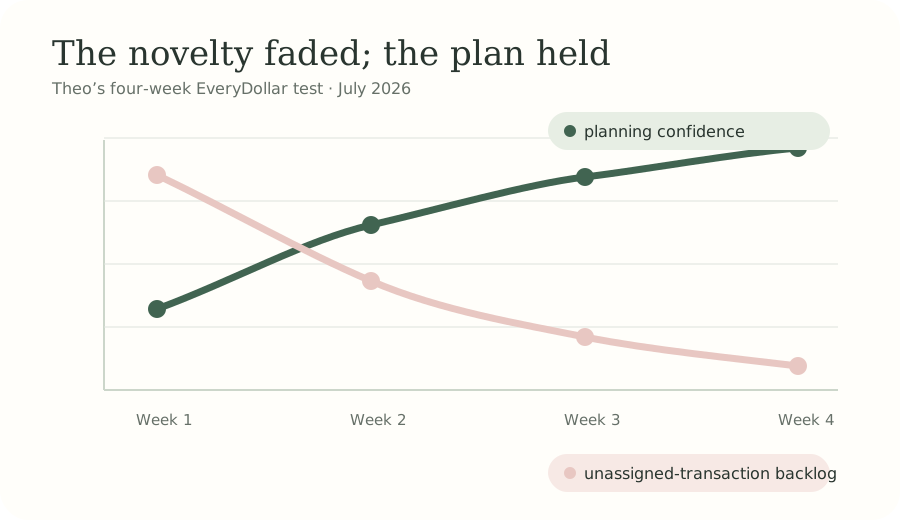
I ran EveryDollar from the day before payday through the next full cycle, first on the free plan and then with a Premium trial. My test budget included one salary, a partner’s bill contribution, rent, eight sinking-fund-style categories, and a stubborn stream of small café purchases. I logged 117 transactions and compared the final categories with bank statements.
What worked
- First monthly plan takes roughly 15 minutes.
- Zero-based arithmetic stays visible and understandable.
- Premium bank imports reduce routine typing.
- Mobile transaction assignment is quick.
What grated
- Automatic import sits behind Premium.
- Free tracking becomes repetitive at high volume.
- Ramsey terminology will not suit every reader.
- Annual planning and reporting are only moderate.
A very good first budget screen
EveryDollar starts with income and walks downward through giving, saving, housing, transport, food, lifestyle, insurance, and debt. You add, remove, or rename categories, then keep assigning amounts until “left to budget” reaches zero. The sequence is more guided than Goodbudget and less rule-heavy than YNAB. I had a credible first draft in 14 minutes.
That zero is easy to misunderstand. It does not tell you to spend everything. Money assigned to an emergency fund or next month’s rent has a job too. EveryDollar explains this cleanly, and the remaining amount acts like a proofreading mark. Our plain-English zero-based budget entry gives a two-minute primer.
Free versus Premium pricing
The free plan costs $0 and supports budget creation, custom categories, savings funds, and manual transaction tracking. EveryDollar Premium was listed at $79.99 per year after a 14-day trial on the official EveryDollar page when checked August 5, 2026. Promotions can alter checkout prices. Premium adds bank transaction import, paycheck planning, financial insights, goal setting, and access to group coaching.
The free version is a complete planner but an incomplete automatic tracker. I averaged about six manual entries a day, which was fine until a busy weekend produced 19. Premium imported cleared transactions and let me drag them into categories, cutting upkeep noticeably. A $79.99 annual fee is reasonable if import keeps you budgeting; it is unnecessary if you enjoy manual entry or mostly spend from a few predictable bills.
| Category | Weight | Score | Weighted points |
|---|---|---|---|
| Planning clarity | 30% | 4.9/5 | 1.47 |
| Daily usability | 25% | 4.6/5 | 1.15 |
| Price and value | 20% | 4.1/5 | 0.82 |
| Automation | 15% | 4.5/5 | 0.68 |
| Support and access | 10% | 4.0/5 | 0.40 |
| Total | 100% | 4.52/5 | 4.52 → 4.5 |
Tracking and reports after the novelty fades
Premium imports were generally dependable in my test, although recently cleared purchases did not always arrive immediately. That is normal for aggregator-based connections, but it means the app’s category balance can lag the bank. The safe habit is to review imports twice a week and check the statement monthly. EveryDollar makes assignment pleasant enough that this took under ten minutes per session.
The reporting tells a useful monthly story—planned, spent, and remaining—but it is not a deep analysis workstation. There is no rich investment view, and long-range cash-flow modeling is not the point. People who primarily want net worth and cross-account trends should consider Monarch Money or Empower from our best budgeting apps ranking.
Who will like EveryDollar?
It suits a beginner who wants firm monthly structure, a debt-paydown household already comfortable with the Ramsey approach, or anyone who finds envelope setup too open-ended. It suits variable-income households less neatly: paycheck planning helps, but the interface still feels designed around a clean monthly cycle. Start with the free plan for one pay cycle, then pay only if manual tracking is the habit-breaking problem.
Goodbudget scored 0.3 points higher because its free sharing and visual envelopes deliver more value before payment. EveryDollar counters with a faster setup and smoother Premium import workflow. Our category-by-category comparison shows where each point went.
EveryDollar FAQ
How much does EveryDollar cost in 2026?
EveryDollar offers a functional free plan with manual transaction entry. The official price we checked on August 5, 2026 was $79.99 per year for Premium after a 14-day trial, though checkout offers can change. Premium adds bank transaction import, paycheck planning, goal tools, group coaching, and additional insights.
Can couples share EveryDollar?
Couples can work from the same budget by using one household login, but collaboration feels less flexible than Goodbudget’s device-based sharing. Agree on categories and update transactions consistently. The app makes a joint monthly plan clear, yet it provides fewer nuanced permissions or household views than dedicated family-finance platforms.
Does EveryDollar use zero-based budgeting?
Yes. It asks you to assign income across giving, saving, spending, and debt until income minus planned expenses equals zero. Zero does not mean spending every dollar; savings and extra debt payments are valid jobs. The clean planning screen makes this method unusually approachable for a first monthly budget.
Is EveryDollar better than Goodbudget?
EveryDollar is better for people who want a fast, guided zero-based setup and are comfortable with its Ramsey framing. Goodbudget is our narrow overall winner because its free plan supports sharing, its envelopes make limits tangible, and its annual Premium price is comparable while offering more flexible household use.
Theo Finch is ThriftWren’s staff reviewer and a community-library assistant. He tested EveryDollar daily for 35 days using the free plan and a publication-funded Premium trial; the company had no input.